Oracle Business Intelligence Applications (OBIA) are complete, prebuilt BI solutions that deliver intuitive, role-based intelligence for everyone in an organization from front line employees to senior management that enable better decisions, actions, and business processes. Designed for heterogeneous environments, these solutions enable organizations to gain insight from a range of data sources and applications including Siebel, Oracle E-Business Suite, PeopleSoft, and third party systems such as SAP.
Oracle BI Applications are built on the Oracle BI Suite Enterprise Edition, a comprehensive, innovative, and leading BI platform. This enables organizations to realize the value of a packaged BI Application, such as rapid deployment, lower TCO, and built-in best practices, while also being able to very easily extend those solutions to meet their specific needs, or build completely custom BI applications, all on one common BI architecture.
Oracle BI Applications includes the following:
■ Oracle Financial Analytics
■ Oracle Human Resources Analytics
■ Oracle Supply Chain and Order Management Analytics
■ Oracle Procurement and Spend Analytics
■ Oracle Project Analytics
■ Oracle Sales Analytics
■ Oracle Service Analytics
■ Oracle Contact Center Telephony Analytics
■ Oracle Marketing Analytics
■ Oracle Loyalty Analytics
■ Oracle Price Analytics
and more
Oracle BI Applications is a prebuilt business intelligence solution.
Oracle BI Applications supports Oracle sources, such as Oracle E-Business Suite Applications, Oracle's Siebel Applications, Oracle's PeopleSoft Applications, Oracle's JD Edwards Applications, and non-Oracle sources, such as SAP Applications. If you already own one of the above applications, you can purchase Oracle Business Intelligence Enterprise Edition and Oracle BI Applications to work with the application.
Oracle BI Applications also provides complete support for enterprise data, including financial, supply chain, workforce, and procurement and spend sources. These enterprise applications typically source from both Oracle data sources, such as Oracle EBS and PeopleSoft and non-Oracle data sources, such as SAP
Topology for an Oracle BI Applications Deployment
Oracle BI Applications and Informatica PowerCenter can be deployed flexibly across a wide range of topologies on different platforms and combinations of platforms.

Machine A (Windows-only)
Machine A is a machine that has installed Oracle Business Intelligence Enterprise Edition, on which you run the Oracle BI Applications installer to install the Oracle BI Applications files.
Note: The instance of Oracle Business Intelligence Enterprise Edition does not need to be the functional version of Oracle Business Intelligence Enterprise Edition that you will use to deploy dashboards in your live system. This instance is only required to enable the Oracle BI Applications installer to install the Oracle BI Applications files on a machine
After the Oracle BI Applications files have been installed on Machine A, the DAC Client is installed on Machine B, and the DAC Server is installed on Machine C.
In addition, the following files are copied from the installation machine (Machine A) to the Business Intelligence Deployment Tier (Machine Group F) as follows:
- The OracleBI\Server\Repository\OracleBIAnalyticsApps.rpd file is copied from Machine A to the machine that runs the BI Server in Machine Group F.
- The OracleBIData\Web\Catalog\EnterpriseBusinessAnalytics\*.* files are copied from Machine A to the machine that runs the BI Presentation Services Catalog in Machine Group F.
• ETL Tier (Functional)
o Machine B (Windows-only)
Runs the DAC Client and Informatica PowerCenter Client Tools.
o Machine C (Windows, UNIX, Linux)
Runs the DAC Server and Informatica PowerCenter Services.
o Machine D (Windows, UNIX, Linux)
Hosts the transactional (OLTP) database.
o Machine E (Windows, UNIX, Linux)
Hosts the Oracle Business Analytics Warehouse database
• BI Deployment Tier (Functional)
The BI Deployment tier is used to deploy the business intelligence dashboards.
o Machine Group F (Windows, UNIX, Linux)
Machine Group F is a group of machines that runs the Oracle Business Intelligence Enterprise Edition components. For example, one machine might run the BI Server and another machine might run the BI Presentation Services
Oracle Business Analytics warehouse architecture when deployed with Informatica PowerCenter and DAC
High-level analytical queries, like those commonly used in Oracle Business Intelligence, scan and analyze large volumes of data using complex formulas. This process can take a long time when querying a transactional database, which impacts overall system performance.
For this reason, the Oracle Business Analytics Warehouse was constructed using dimensional modeling techniques to allow for fast access to information required for decision making. The Oracle Business Analytics Warehouse derives its data from operational applications and uses Informatica PowerCenter to extract, transform, and load data from various supported transactional database systems (OLTP) into the Oracle Business Analytics Warehouse.

• The Client tier contains the Informatica PowerCenter client tools and the Oracle BI Data Warehouse Administration Console (DAC). DAC is a command and control interface for the data warehouse to allow for set up, configuration, administration, and monitoring of data warehouse processes.
• The Server tier contains the following:
o DAC Server. Executes the instructions from the DAC Client. The DAC Server manages data warehouse processes, including scheduling, loading of the ETL, and configuring the subject areas to be loaded. It dynamically adjusts its actions based on information in the DAC Repository. Depending on your business needs, you might incrementally refresh the Oracle Business Analytics Warehouse once a day, once a week, once a month, or on another similar schedule.
o DAC Repository. Stores the metadata (semantics of the Oracle Business Analytics Warehouse) that represents the data warehouse processes.
o Informatica PowerCenter Services:
Integration Services - The Integration Service reads workflow information from the repository. The Integration Service connects to the repository through the Repository Service to fetch metadata from the repository.
Repository Services - The Repository Service manages connections to the PowerCenter Repository from client applications. The Repository Service is a separate, multi-threaded process that retrieves, inserts, and updates metadata in the repository database tables.
o Informatica Repository. Stores the metadata related to Informatica workflows.
• The Database tier contains the OLTP and OLAP databases.
The Informatica Repository stores all of the Informatica object definitions for the ETL mappings that populate the Oracle Business Analytics Warehouse. It is a series of repository tables that are stored in a database, which can be a transactional, analytical, or separate database
Oracle BI Applications Components (with Informatica/DAC)

Oracle Business Analytics Warehouse Overview
The Oracle Business Analytics Warehouse is a unified data repository for all customer-centric data, which supports the analytical requirements of the supported source systems.
The Oracle Business Analytics Warehouse includes the following:
• A complete relational enterprise data warehouse data model with numerous prebuilt star schemas encompassing many conformed dimensions and several hundred fact tables.
• An open architecture to allow organizations to use third-party analytical tools in conjunction with the Oracle Business Analytics Warehouse using the Oracle Business Intelligence Server
• A set of ETL (extract-transform-load) processes that takes data from a wide range of source systems and creates the Oracle Business Analytics Warehouse tables.
• The Oracle Business Intelligence Data Warehouse Administration Console (DAC), a centralized console for the set up, configuration, administration, loading, and monitoring of the Oracle Business Analytics Warehouse
Important points
The metadata for a source system is held in a container
The PowerCenter Services can be installed on UNIX or on Windows.
The PowerCenter Client Tools must be installed on Windows.
You must co-locate the DAC Client with the Informatica PowerCenter Client Tools.
■ You must co-locate the DAC Server with Informatica PowerCenter Services.
DAC produces parameter files that are used by Informatica. If an execution plan
fails in DAC and you want to debug the workflow by running it directly from
Informatica, then the parameter file produced by DAC should be visible to
Informatica. This is one reason for the requirement to co-locate the DAC and
Informatica components as stated above
The DAC installer installs the DAC Client and DAC Server on Windows.
DAC Client only runs on Windows.
DAC Servers runs on Windows, UNIX, and Linux.
The DAC Server can run on Linux, but it must first be installed on a Windows
machine, then copied over to a Linux machine. Oracle does not provides an installer
for DAC on UNIX
The DAC Client can only be installed and run on Windows.
■ The DAC Client must be installed on the machine where Informatica PowerCenter
Client Tools was installed.
■ The DAC Server must be installed on the machine where Informatica PowerCenter
Services was installed.
■ You must install Informatica PowerCenter Services before you install DAC.
■ The correct version of the JDK is installed by the DAC installer.
■ The DAC installer installs DAC in the DAC_HOME\bifoundation\dac directory.
The DAC Client uses the Informatica pmrep and pmcmd command line programs
when communicating with Informatica PowerCenter. The DAC Client uses pmrep to
synchronize DAC tasks with Informatica workflows and to keep the DAC task source
and target tables information up to date.
In order for the DAC Client to be able to use the pmrep and pmcmd programs, the
path of the Informatica Domain file 'domains.infa' must be defined in the environment
variables on the DAC Client machine.
When you install DAC using the DAC installer, the Informatica Domain file is defined
in the environment variables on the DAC Client machine.
INFA_DOMAINS_FILE
C:\Informatica\9.0.1\clients\PowerCenterClient\domains.infa
The DAC Server uses the following command line programs to communicate with
Informatica PowerCenter:
■ pmrep is used to communicate with PowerCenter Repository Services.
■ pmcmd is used to communicate with PowerCenter Integration Services to run the
Informatica workflows.
The pmrep and pmcmd programs are installed during the PowerCenter Services
installation in the INFA_HOME\server\bin directory on the Informatica PowerCenter
Services machine
Oracle Business Intelligence Applications V7.9.6.3 requires Oracle Business
Intelligence Enterprise Edition V11.1.1.5.0.
■ Oracle Business Intelligence Applications V7.9.6.3 requires Informatica
PowerCenter V9.0.1. Hotfix 2.
■ Oracle Business Intelligence Applications V7.9.6.3 requires Oracle Data Warehouse
Console V10.1.3.4.1.
The OBIEE server uses the metadata to generate the SQL queries. It is stored in the
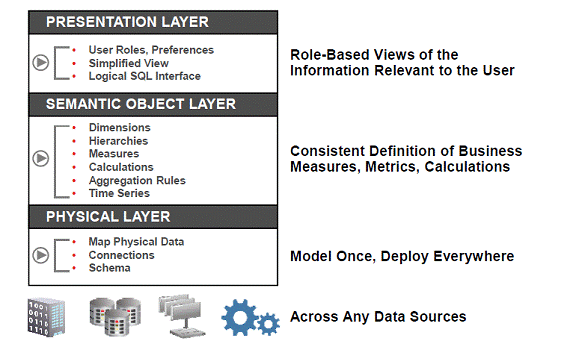
Repository or often referred to as .rpd. The repository has three layer as shown below, the physical layer, logical layer and the presentation layer.
Metadata maps the OBAW physical tables to a generic business model and includes more than 100 presentation catalogs (aka subject areas) to allow queries using Oracle BI clients such as Answers, Dashboards

High Level Data Flow
• Source – eBS (Raw Data)
• ETL – Extraction Transform and Load (Informatica – PowerCenter or
ODI)
• OBAW - Business Analytics Warehouse
• OBIEE Metadata
• OBIEE Content – Reports and Dashboards

• A prebuilt Informatica repository which includes mappings (wrapped in workflows) to extract data from the supported source systems (various versions of standard applications such as Siebel CRM - yes it was first - , Oracle eBusiness Suite, Peoplesoft, JDEdwards and SAP (BI Apps version 7.8.4) ) and load the data into the Oracle Business Analysis Warehouse. (Note: Oracle BI Applications version 7.9.5.2 includes a repository for the Oracle Data Integrator instead of Informatica but supports only Oracle Financials).
• The Oracle Business Analysis Warehouse (OBAW), a prebuilt schema (stars that is) which serves as a turnkey data warehouse including dozens of stars and accompanying indexes, aggregates, time dimensions and slowly changing dimension handling (and yes, it can be optimized).
• A prebuilt repository for the Data Warehouse Administration Console (DAC) server which is the orchestration engine behind the ETL process. The DAC client and server were included until version 7.9.5. Since then it is a separate installer.
• A prebuilt Oracle BI Server repository (rpd file) which maps the OBAW physical tables to a generic business model and includes more than 100 presentation catalogs (aka subject areas) to allow queries and segmentation using Oracle BI clients such as Answers, Dashboards and Segment Designer. Did I mention that it also takes care of authentication and data security?
• A prebuilt presentation catalog (repository) containing hundreds of requests and ready-to-use dashboards which enable tight integration between the source applications and the BI infrastructure (example: Click the Service Analytics screen in Siebel CRM, work with the dashboard data, drill down to details and click an action button to navigate back to the Siebel CRM record).
Oracle BI EE 10g is the successor of Siebel Analytics and Oracle BI Applications is the successor of Siebel Analytics Applications.
Detailed Data flow

First, the DAC scheduler kicks off jobs to loadrefresh the OBAW at regular intervals or alternatively, these jobs could be kicked off manually from the DAC client.
The DAC server uses the object and configuration data stored in the DAC repository to issue commands to the informatica Server.
The informatica server executes the commands issued from DAC, and uses the objects and configuration data stored in the informatica repository.
Then the data are extracted, transferred and loaded from the transactional databases into the OBAW target tables.
After the ETL is complete and OBAW is online, an OBIEE end user runs a dashboard or report in the Answers or Interactive dashboard.
The request comes through the web server and interacts with the presentation server.
The presentation server interacts with OBI Server and OBI server will understand the requests and hits the OBAW if it’s not cashed and extracts the data and provides it to the presentation server.
The presentation server formats the data into the required format and through web server, the request is presented to the end user
ETL process

ETL mappings are split into two main mappings, SDE mappings and SIL mappings.
2 SDE mappings load the staging tables,then SIL mappings (SILOS, SIL_Vert, PLP) load the final physical warehouse tables
3 SILOS SIL mappings are for all sources except Siebel Verticals. SIL_Vert SIL mappings are for Siebel Verticals only
4 Staging tables are suffixed with S, so W_AP_XACTS_F is the final table and the staging table is W_AP_XACTS_FS
Oracle BI Applications are built on the Oracle BI Suite Enterprise Edition, a comprehensive, innovative, and leading BI platform. This enables organizations to realize the value of a packaged BI Application, such as rapid deployment, lower TCO, and built-in best practices, while also being able to very easily extend those solutions to meet their specific needs, or build completely custom BI applications, all on one common BI architecture.
Oracle BI Applications includes the following:
■ Oracle Financial Analytics
■ Oracle Human Resources Analytics
■ Oracle Supply Chain and Order Management Analytics
■ Oracle Procurement and Spend Analytics
■ Oracle Project Analytics
■ Oracle Sales Analytics
■ Oracle Service Analytics
■ Oracle Contact Center Telephony Analytics
■ Oracle Marketing Analytics
■ Oracle Loyalty Analytics
■ Oracle Price Analytics
and more
Oracle BI Applications is a prebuilt business intelligence solution.
Oracle BI Applications supports Oracle sources, such as Oracle E-Business Suite Applications, Oracle's Siebel Applications, Oracle's PeopleSoft Applications, Oracle's JD Edwards Applications, and non-Oracle sources, such as SAP Applications. If you already own one of the above applications, you can purchase Oracle Business Intelligence Enterprise Edition and Oracle BI Applications to work with the application.
Oracle BI Applications also provides complete support for enterprise data, including financial, supply chain, workforce, and procurement and spend sources. These enterprise applications typically source from both Oracle data sources, such as Oracle EBS and PeopleSoft and non-Oracle data sources, such as SAP
Topology for an Oracle BI Applications Deployment
Oracle BI Applications and Informatica PowerCenter can be deployed flexibly across a wide range of topologies on different platforms and combinations of platforms.

Machine A (Windows-only)
Machine A is a machine that has installed Oracle Business Intelligence Enterprise Edition, on which you run the Oracle BI Applications installer to install the Oracle BI Applications files.
Note: The instance of Oracle Business Intelligence Enterprise Edition does not need to be the functional version of Oracle Business Intelligence Enterprise Edition that you will use to deploy dashboards in your live system. This instance is only required to enable the Oracle BI Applications installer to install the Oracle BI Applications files on a machine
After the Oracle BI Applications files have been installed on Machine A, the DAC Client is installed on Machine B, and the DAC Server is installed on Machine C.
In addition, the following files are copied from the installation machine (Machine A) to the Business Intelligence Deployment Tier (Machine Group F) as follows:
- The OracleBI\Server\Repository\OracleBIAnalyticsApps.rpd file is copied from Machine A to the machine that runs the BI Server in Machine Group F.
- The OracleBIData\Web\Catalog\EnterpriseBusinessAnalytics\*.* files are copied from Machine A to the machine that runs the BI Presentation Services Catalog in Machine Group F.
• ETL Tier (Functional)
o Machine B (Windows-only)
Runs the DAC Client and Informatica PowerCenter Client Tools.
o Machine C (Windows, UNIX, Linux)
Runs the DAC Server and Informatica PowerCenter Services.
o Machine D (Windows, UNIX, Linux)
Hosts the transactional (OLTP) database.
o Machine E (Windows, UNIX, Linux)
Hosts the Oracle Business Analytics Warehouse database
• BI Deployment Tier (Functional)
The BI Deployment tier is used to deploy the business intelligence dashboards.
o Machine Group F (Windows, UNIX, Linux)
Machine Group F is a group of machines that runs the Oracle Business Intelligence Enterprise Edition components. For example, one machine might run the BI Server and another machine might run the BI Presentation Services
Oracle Business Analytics warehouse architecture when deployed with Informatica PowerCenter and DAC
High-level analytical queries, like those commonly used in Oracle Business Intelligence, scan and analyze large volumes of data using complex formulas. This process can take a long time when querying a transactional database, which impacts overall system performance.
For this reason, the Oracle Business Analytics Warehouse was constructed using dimensional modeling techniques to allow for fast access to information required for decision making. The Oracle Business Analytics Warehouse derives its data from operational applications and uses Informatica PowerCenter to extract, transform, and load data from various supported transactional database systems (OLTP) into the Oracle Business Analytics Warehouse.

• The Client tier contains the Informatica PowerCenter client tools and the Oracle BI Data Warehouse Administration Console (DAC). DAC is a command and control interface for the data warehouse to allow for set up, configuration, administration, and monitoring of data warehouse processes.
• The Server tier contains the following:
o DAC Server. Executes the instructions from the DAC Client. The DAC Server manages data warehouse processes, including scheduling, loading of the ETL, and configuring the subject areas to be loaded. It dynamically adjusts its actions based on information in the DAC Repository. Depending on your business needs, you might incrementally refresh the Oracle Business Analytics Warehouse once a day, once a week, once a month, or on another similar schedule.
o DAC Repository. Stores the metadata (semantics of the Oracle Business Analytics Warehouse) that represents the data warehouse processes.
o Informatica PowerCenter Services:
Integration Services - The Integration Service reads workflow information from the repository. The Integration Service connects to the repository through the Repository Service to fetch metadata from the repository.
Repository Services - The Repository Service manages connections to the PowerCenter Repository from client applications. The Repository Service is a separate, multi-threaded process that retrieves, inserts, and updates metadata in the repository database tables.
o Informatica Repository. Stores the metadata related to Informatica workflows.
• The Database tier contains the OLTP and OLAP databases.
The Informatica Repository stores all of the Informatica object definitions for the ETL mappings that populate the Oracle Business Analytics Warehouse. It is a series of repository tables that are stored in a database, which can be a transactional, analytical, or separate database
Oracle BI Applications Components (with Informatica/DAC)

Oracle Business Analytics Warehouse Overview
The Oracle Business Analytics Warehouse is a unified data repository for all customer-centric data, which supports the analytical requirements of the supported source systems.
The Oracle Business Analytics Warehouse includes the following:
• A complete relational enterprise data warehouse data model with numerous prebuilt star schemas encompassing many conformed dimensions and several hundred fact tables.
• An open architecture to allow organizations to use third-party analytical tools in conjunction with the Oracle Business Analytics Warehouse using the Oracle Business Intelligence Server
• A set of ETL (extract-transform-load) processes that takes data from a wide range of source systems and creates the Oracle Business Analytics Warehouse tables.
• The Oracle Business Intelligence Data Warehouse Administration Console (DAC), a centralized console for the set up, configuration, administration, loading, and monitoring of the Oracle Business Analytics Warehouse
Important points
The metadata for a source system is held in a container
The PowerCenter Services can be installed on UNIX or on Windows.
The PowerCenter Client Tools must be installed on Windows.
You must co-locate the DAC Client with the Informatica PowerCenter Client Tools.
■ You must co-locate the DAC Server with Informatica PowerCenter Services.
DAC produces parameter files that are used by Informatica. If an execution plan
fails in DAC and you want to debug the workflow by running it directly from
Informatica, then the parameter file produced by DAC should be visible to
Informatica. This is one reason for the requirement to co-locate the DAC and
Informatica components as stated above
The DAC installer installs the DAC Client and DAC Server on Windows.
DAC Client only runs on Windows.
DAC Servers runs on Windows, UNIX, and Linux.
The DAC Server can run on Linux, but it must first be installed on a Windows
machine, then copied over to a Linux machine. Oracle does not provides an installer
for DAC on UNIX
The DAC Client can only be installed and run on Windows.
■ The DAC Client must be installed on the machine where Informatica PowerCenter
Client Tools was installed.
■ The DAC Server must be installed on the machine where Informatica PowerCenter
Services was installed.
■ You must install Informatica PowerCenter Services before you install DAC.
■ The correct version of the JDK is installed by the DAC installer.
■ The DAC installer installs DAC in the DAC_HOME\bifoundation\dac directory.
The DAC Client uses the Informatica pmrep and pmcmd command line programs
when communicating with Informatica PowerCenter. The DAC Client uses pmrep to
synchronize DAC tasks with Informatica workflows and to keep the DAC task source
and target tables information up to date.
In order for the DAC Client to be able to use the pmrep and pmcmd programs, the
path of the Informatica Domain file 'domains.infa' must be defined in the environment
variables on the DAC Client machine.
When you install DAC using the DAC installer, the Informatica Domain file is defined
in the environment variables on the DAC Client machine.
INFA_DOMAINS_FILE
C:\Informatica\9.0.1\clients\PowerCenterClient\domains.infa
The DAC Server uses the following command line programs to communicate with
Informatica PowerCenter:
■ pmrep is used to communicate with PowerCenter Repository Services.
■ pmcmd is used to communicate with PowerCenter Integration Services to run the
Informatica workflows.
The pmrep and pmcmd programs are installed during the PowerCenter Services
installation in the INFA_HOME\server\bin directory on the Informatica PowerCenter
Services machine
Oracle Business Intelligence Applications V7.9.6.3 requires Oracle Business
Intelligence Enterprise Edition V11.1.1.5.0.
■ Oracle Business Intelligence Applications V7.9.6.3 requires Informatica
PowerCenter V9.0.1. Hotfix 2.
■ Oracle Business Intelligence Applications V7.9.6.3 requires Oracle Data Warehouse
Console V10.1.3.4.1.
The OBIEE server uses the metadata to generate the SQL queries. It is stored in the
Repository or often referred to as .rpd. The repository has three layer as shown below, the physical layer, logical layer and the presentation layer.
Metadata maps the OBAW physical tables to a generic business model and includes more than 100 presentation catalogs (aka subject areas) to allow queries using Oracle BI clients such as Answers, Dashboards
High Level Data Flow
• Source – eBS (Raw Data)
• ETL – Extraction Transform and Load (Informatica – PowerCenter or
ODI)
• OBAW - Business Analytics Warehouse
• OBIEE Metadata
• OBIEE Content – Reports and Dashboards

• A prebuilt Informatica repository which includes mappings (wrapped in workflows) to extract data from the supported source systems (various versions of standard applications such as Siebel CRM - yes it was first - , Oracle eBusiness Suite, Peoplesoft, JDEdwards and SAP (BI Apps version 7.8.4) ) and load the data into the Oracle Business Analysis Warehouse. (Note: Oracle BI Applications version 7.9.5.2 includes a repository for the Oracle Data Integrator instead of Informatica but supports only Oracle Financials).
• The Oracle Business Analysis Warehouse (OBAW), a prebuilt schema (stars that is) which serves as a turnkey data warehouse including dozens of stars and accompanying indexes, aggregates, time dimensions and slowly changing dimension handling (and yes, it can be optimized).
• A prebuilt repository for the Data Warehouse Administration Console (DAC) server which is the orchestration engine behind the ETL process. The DAC client and server were included until version 7.9.5. Since then it is a separate installer.
• A prebuilt Oracle BI Server repository (rpd file) which maps the OBAW physical tables to a generic business model and includes more than 100 presentation catalogs (aka subject areas) to allow queries and segmentation using Oracle BI clients such as Answers, Dashboards and Segment Designer. Did I mention that it also takes care of authentication and data security?
• A prebuilt presentation catalog (repository) containing hundreds of requests and ready-to-use dashboards which enable tight integration between the source applications and the BI infrastructure (example: Click the Service Analytics screen in Siebel CRM, work with the dashboard data, drill down to details and click an action button to navigate back to the Siebel CRM record).
Oracle BI EE 10g is the successor of Siebel Analytics and Oracle BI Applications is the successor of Siebel Analytics Applications.
Detailed Data flow

First, the DAC scheduler kicks off jobs to loadrefresh the OBAW at regular intervals or alternatively, these jobs could be kicked off manually from the DAC client.
The DAC server uses the object and configuration data stored in the DAC repository to issue commands to the informatica Server.
The informatica server executes the commands issued from DAC, and uses the objects and configuration data stored in the informatica repository.
Then the data are extracted, transferred and loaded from the transactional databases into the OBAW target tables.
After the ETL is complete and OBAW is online, an OBIEE end user runs a dashboard or report in the Answers or Interactive dashboard.
The request comes through the web server and interacts with the presentation server.
The presentation server interacts with OBI Server and OBI server will understand the requests and hits the OBAW if it’s not cashed and extracts the data and provides it to the presentation server.
The presentation server formats the data into the required format and through web server, the request is presented to the end user
ETL process

ETL mappings are split into two main mappings, SDE mappings and SIL mappings.
2 SDE mappings load the staging tables,then SIL mappings (SILOS, SIL_Vert, PLP) load the final physical warehouse tables
3 SILOS SIL mappings are for all sources except Siebel Verticals. SIL_Vert SIL mappings are for Siebel Verticals only
4 Staging tables are suffixed with S, so W_AP_XACTS_F is the final table and the staging table is W_AP_XACTS_FS
